Open your laptop right now and count what is talking to the internet. A browser with six tabs, WhatsApp Web, Spotify, maybe a game launcher updating in the background. All of these share one Wi-Fi connection and one IP address. So when a packet arrives at your machine, how does your computer know that this particular packet belongs to Spotify and not to Chrome?
The IP layer can't answer that. IP only gets data from one machine to another machine. Getting data to the right program on that machine is the transport layer's job, and it does it with two protocols you will meet in every networks exam: UDP and TCP.
The easiest way to understand how they differ is to look at their headers. A header is the small block of control information stuck to the front of your data. Whatever a protocol can do, it can only do because some field in its header makes it possible. UDP's header is tiny, so UDP does very little. TCP's header is bigger, and every extra field pays for a feature.
This post walks through both headers field by field, then works out two exam-style problems at the end.
First, ports and sockets
Think of an apartment building. The building's street address gets the courier to the right building. The flat number gets the parcel to the right family.
- The IP address is the building address. It identifies the machine.
- The port number is the flat number. It identifies the process (program) on that machine.
A port number is a 16-bit unsigned integer, so it can be anything from 0 to 65,535. Some ports are well known: 80 for HTTP, 443 for HTTPS, 53 for DNS, 22 for SSH.
Put an IP address and a port together and you get a socket address, written like 192.168.1.10:443. A socket address names one exact endpoint on the whole internet: this program, on this machine.
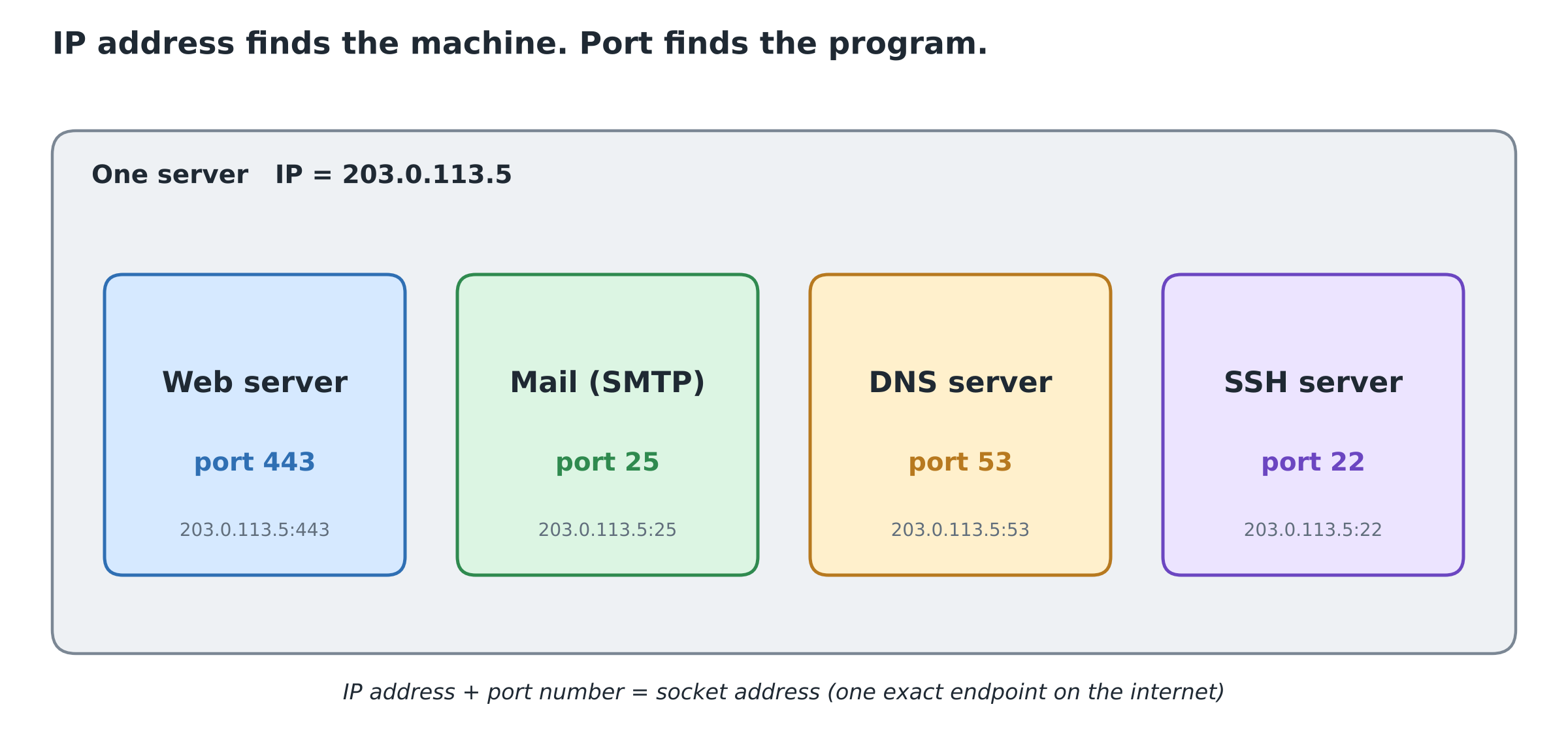
Notice that a client program, like your browser, does not use port 443 itself. The OS gives it a random temporary port (often above 49152), called an ephemeral port. The server is the side that sits on the well-known port and waits.
Both UDP and TCP start their headers with a source port and a destination port. That is the part they have in common. Everything after that is where they split.
Where this header lives
Before reading the fields, it helps to see where the transport header sits. Your message gets wrapped layer by layer, like a letter going into an envelope that then goes into a courier bag.
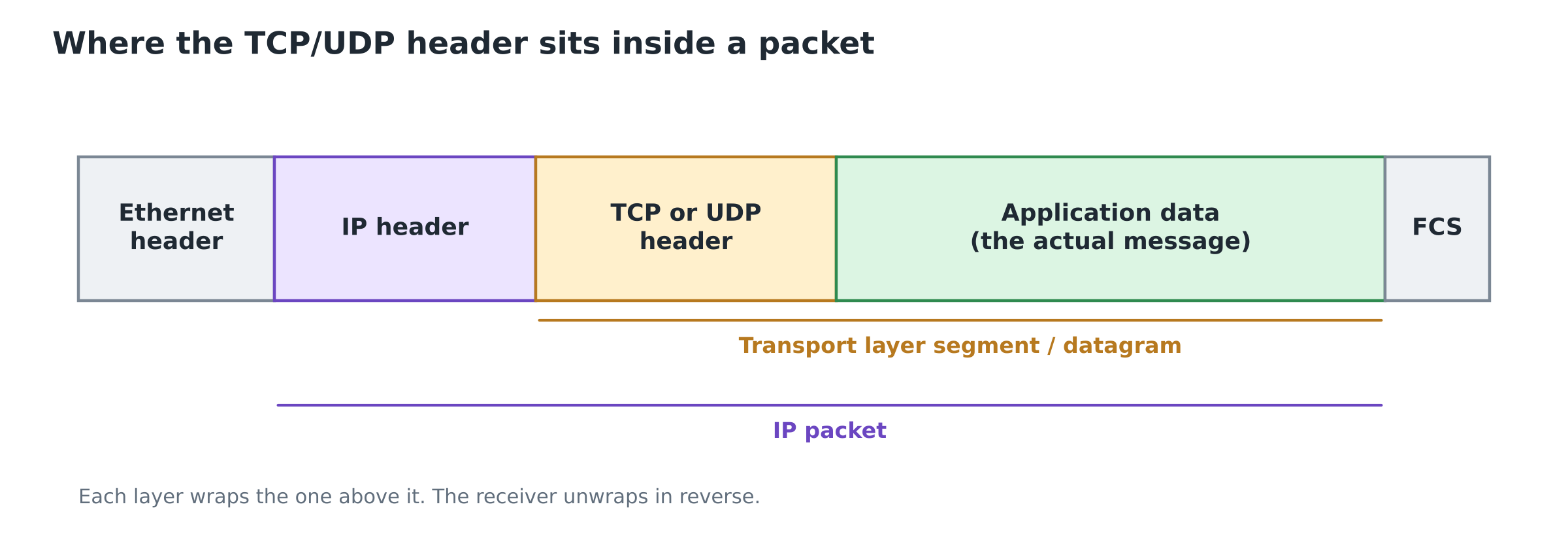
The application hands its data down. TCP or UDP sticks its header in front and the result is called a segment (TCP) or a user datagram (UDP). IP then adds its own header in front of that, and so on down the stack. The receiver peels the layers off in reverse order. By the time the transport layer sees the packet, the IP header is already gone, which is why the transport header needs its own port numbers.
The UDP header: 8 bytes and done
UDP (User Datagram Protocol) is connectionless. It does not set up a connection, does not number its packets, and does not resend anything that gets lost. It hands your data to IP and moves on. People call this "best effort" delivery.
A UDP packet is called a user datagram. Its header is always exactly 8 bytes (64 bits), split into four 16-bit fields:
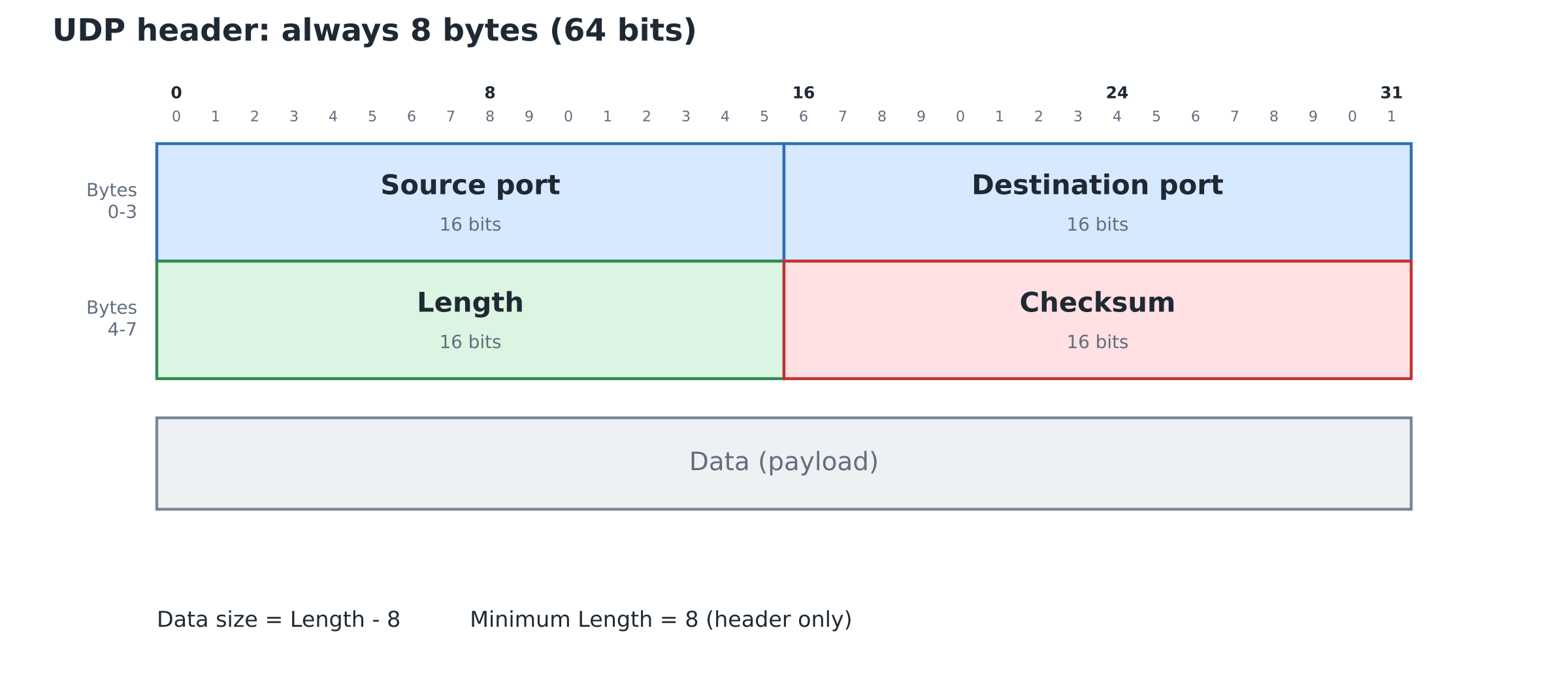
How to read this diagram: each row is 32 bits (4 bytes) wide. The numbers along the top count bit positions. So the first row holds two 16-bit fields side by side.
Source port (16 bits)
The port of the program that sent the datagram. If the sender doesn't expect any reply, it is allowed to put 0 here.
Destination port (16 bits)
The port of the program that should receive it. A DNS query, for example, goes to port 53.
Length (16 bits)
The total size of the user datagram in bytes, header plus data. Since the header alone is 8 bytes, this field can never be less than 8. A datagram with no data at all has Length = 8.
A quick formula worth remembering:
Data size = Length - 8
Checksum (16 bits)
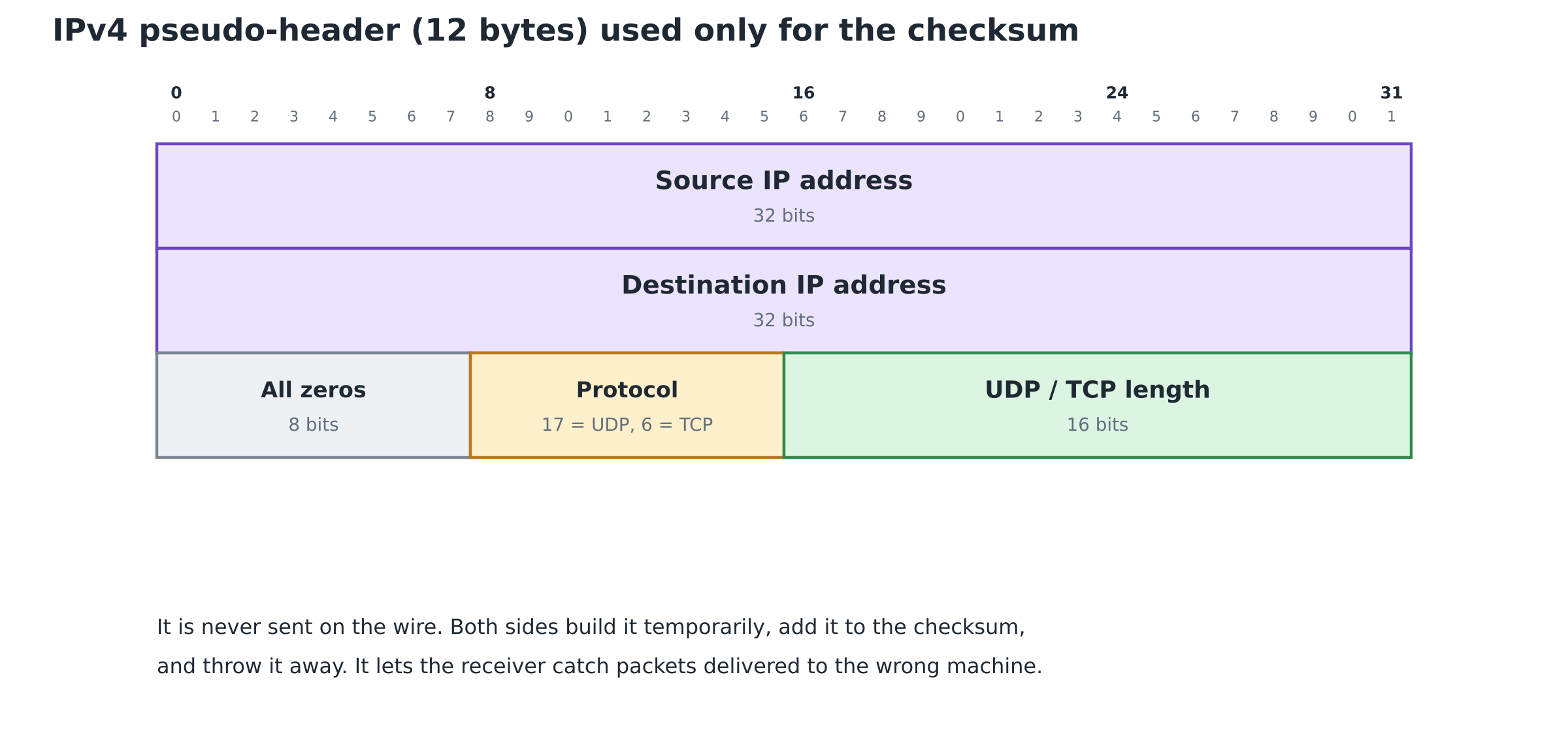
Used to detect errors. The checksum is calculated over three things: the UDP header, the data, and a 12-byte pseudo-header borrowed from the IP layer. The pseudo-header contains the source and destination IP addresses, the protocol number, and the UDP length. Including it means a datagram that reached the wrong machine will fail the check, even if its own bytes arrived intact.
In IPv4, the UDP checksum is optional. A sender that skips it fills the field with all zeros. In IPv6 it is mandatory.
The pseudo-header, field by field
The pseudo-header trips up a lot of students, so here it is drawn out:
| Field | Size | What goes in it |
|---|---|---|
| Source IP address | 32 bits | Sender's IP, copied from the IP header |
| Destination IP address | 32 bits | Receiver's IP, copied from the IP header |
| Zeros | 8 bits | Padding so the next fields line up |
| Protocol | 8 bits | 17 for UDP, 6 for TCP |
| Length | 16 bits | The UDP Length field (for TCP, the segment length) |
Add those up: 4 + 4 + 1 + 1 + 2 = 12 bytes. The pseudo-header is never transmitted. The sender builds it in memory just to compute the checksum, and the receiver builds the same thing from the IP header it received. If anything differs, the checksum fails.
The protocol field is a nice detail: it means a UDP datagram can't pass as TCP, because 17 and 6 produce different checksums.
That is the entire UDP header. Two ports, a length, a checksum. No sequence numbers, no acknowledgments, no flags. This is why UDP is fast and why it can lose packets without noticing.
The TCP header: 20 to 60 bytes of bookkeeping
TCP (Transmission Control Protocol) makes very different promises. It is connection-oriented, reliable, and treats your data as a continuous stream of bytes. Before sending anything, the two sides set up a connection using the three-way handshake. After that, TCP has to:
- notice lost data and resend it,
- put bytes back in order if they arrive scrambled,
- slow down if the receiver can't keep up,
- close the connection cleanly at the end.
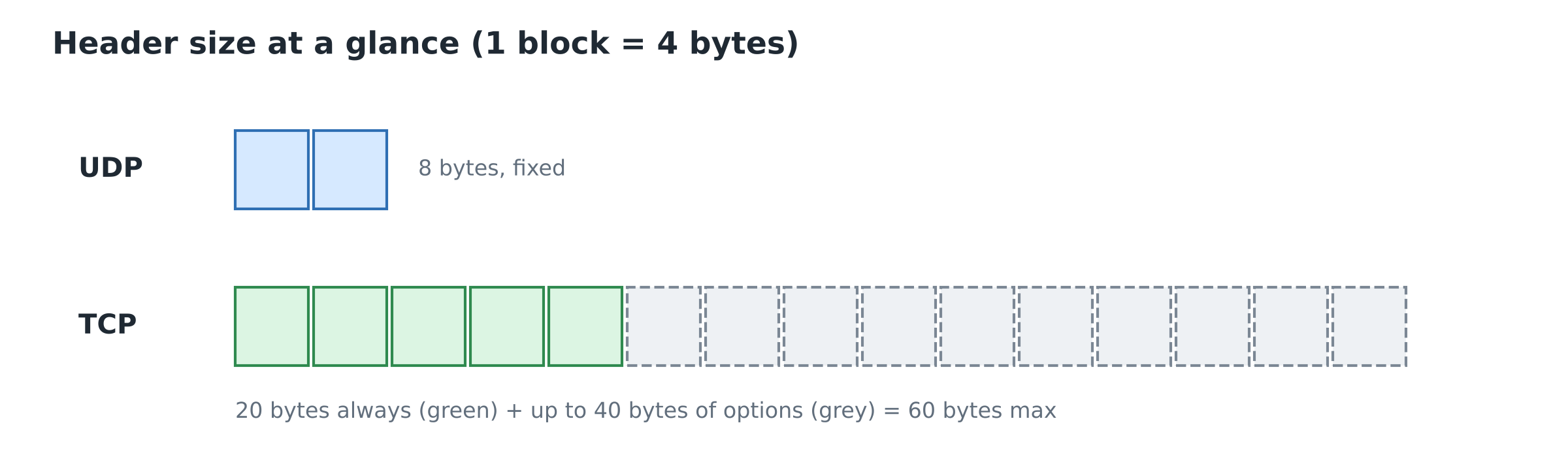
Each of these needs a field in the header. That is why the TCP header is at least 20 bytes and can grow to 60 bytes when options are added.
A TCP packet is called a segment. Here is its header:
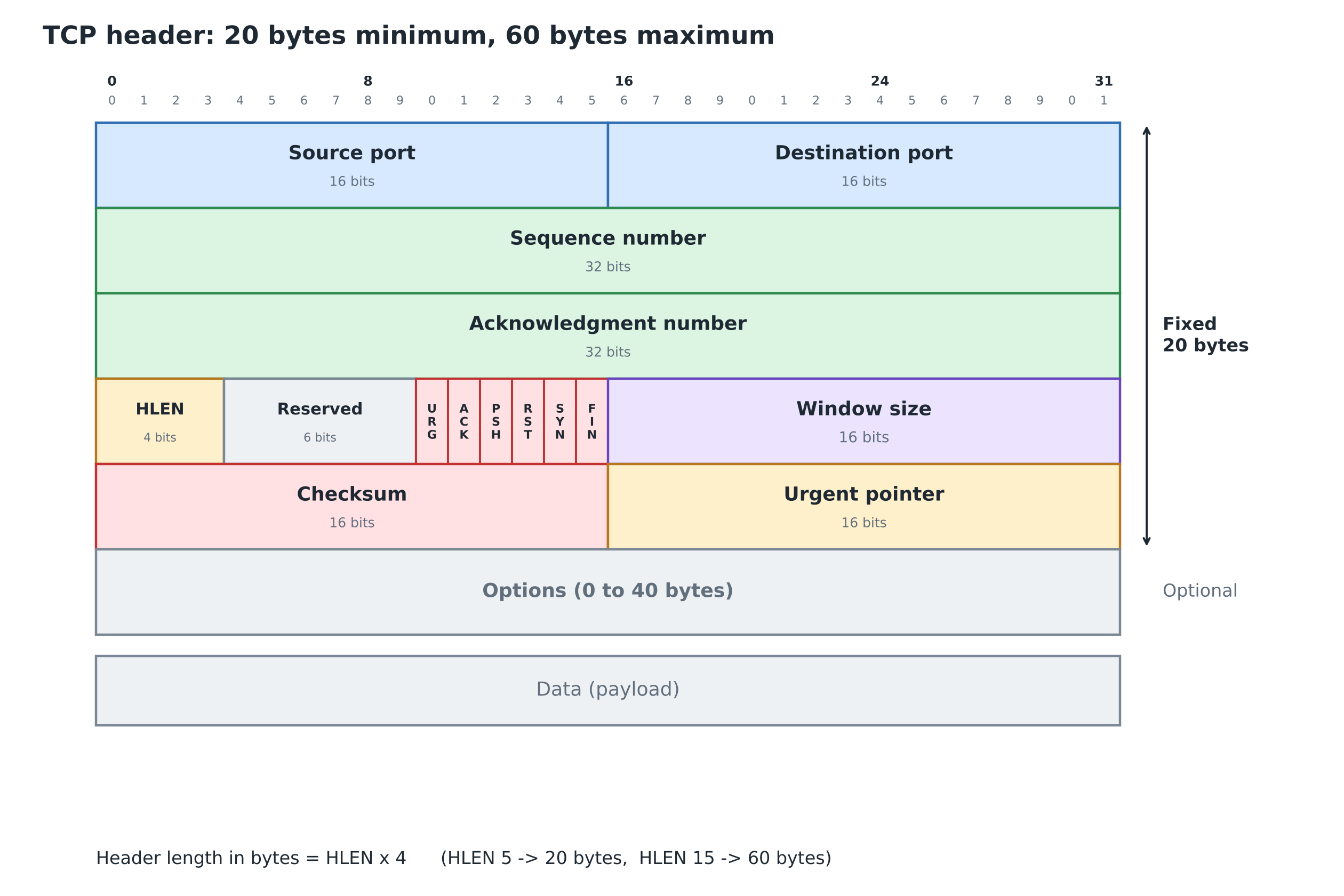
The first five rows (5 × 4 = 20 bytes) are always there. The Options row is the only part that changes size.
1. Source and destination ports (16 bits each)
Same job as in UDP: which program sent this, and which program should get it.
2. Sequence number (32 bits)
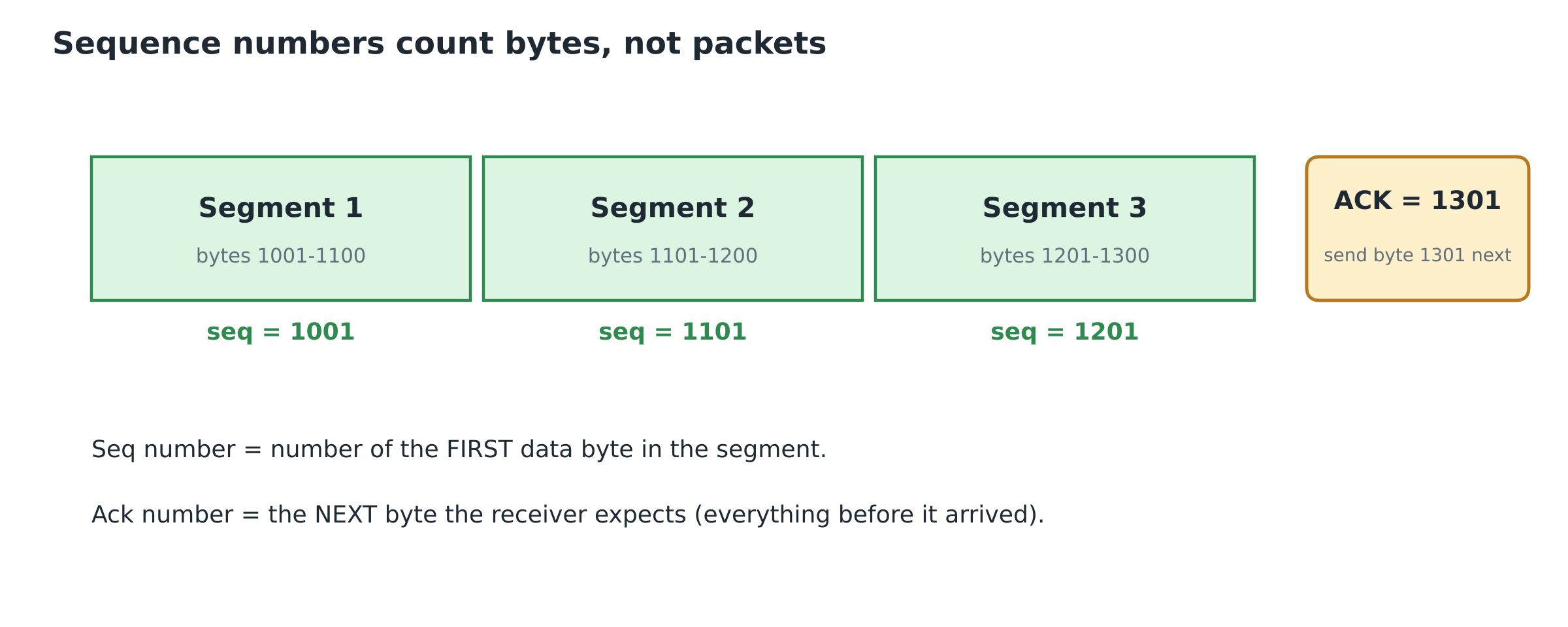
TCP doesn't number packets. It numbers bytes. Every byte you send gets its own number.
When a connection starts, each side picks a random starting number called the Initial Sequence Number (ISN). The sequence number in a segment's header is the number of the first data byte inside that segment.
An example makes this clear. Say the ISN is 1000, and the sender sends three segments of 100 bytes each:
| Segment | Bytes carried | Sequence number in header |
|---|---|---|
| 1 | 1001 to 1100 | 1001 |
| 2 | 1101 to 1200 | 1101 |
| 3 | 1201 to 1300 | 1201 |
(The first data byte is ISN + 1 because the SYN at the start of the connection uses up one sequence number.)
If segment 2 arrives before segment 1, the receiver looks at the sequence numbers and puts them back in order.
3. Acknowledgment number (32 bits)
This is how the receiver says what it has received. TCP acknowledgments are cumulative. An acknowledgment number of X means:
"I've received every byte up to X - 1. Send me byte X next."
So in the table above, after receiving all three segments correctly, the receiver sends back ACK = 1301.
This field only counts when the ACK flag (below) is set to 1.
4. Data offset, also called HLEN (4 bits)
Tells the receiver how long the TCP header is, so it knows where the header ends and the data begins.
The catch, and the thing exams love: the value is counted in 4-byte words, not in bytes.
Header length in bytes = HLEN × 4
- With no options, the header is 20 bytes, so HLEN = 20 / 4 = 5 (binary
0101). - The largest 4-bit value is 15 (binary
1111), so the biggest possible header is 15 × 4 = 60 bytes. - That leaves 60 - 20 = 40 bytes as the most space options can ever take.
HLEN can never be less than 5. If you see HLEN = 3 in a question, that segment is invalid.
5. Reserved (6 bits)
Kept for future use and set to zero. Newer TCP versions use some of these bits for Explicit Congestion Notification (the ECE and CWR flags), but for most university syllabi you can treat this as 6 reserved bits.
6. Control flags (6 bits)
Six one-bit switches. Each one is either on (1) or off (0), and together they control the connection.
| Flag | Name | What it means when set to 1 |
|---|---|---|
| URG | Urgent | The Urgent Pointer field is valid |
| ACK | Acknowledgment | The Acknowledgment Number field is valid. Almost every segment after the handshake has this set |
| PSH | Push | Hand this data to the application now instead of waiting for the buffer to fill |
| RST | Reset | Abort the connection right away (invalid connection, refused request, or a crash) |
| SYN | Synchronize | Used to set up a connection and exchange starting sequence numbers. Only the first two segments of the three-way handshake have SYN = 1 |
| FIN | Finish | The sender has no more data and wants to close the connection gracefully |
A trick for remembering the order from left to right: Unskilled Attackers Pester Real Security Folks (URG, ACK, PSH, RST, SYN, FIN).
Watching the flags in action: the three-way handshake
Flags make more sense once you see them used. This is how a client and server open a TCP connection, and what each header carries:
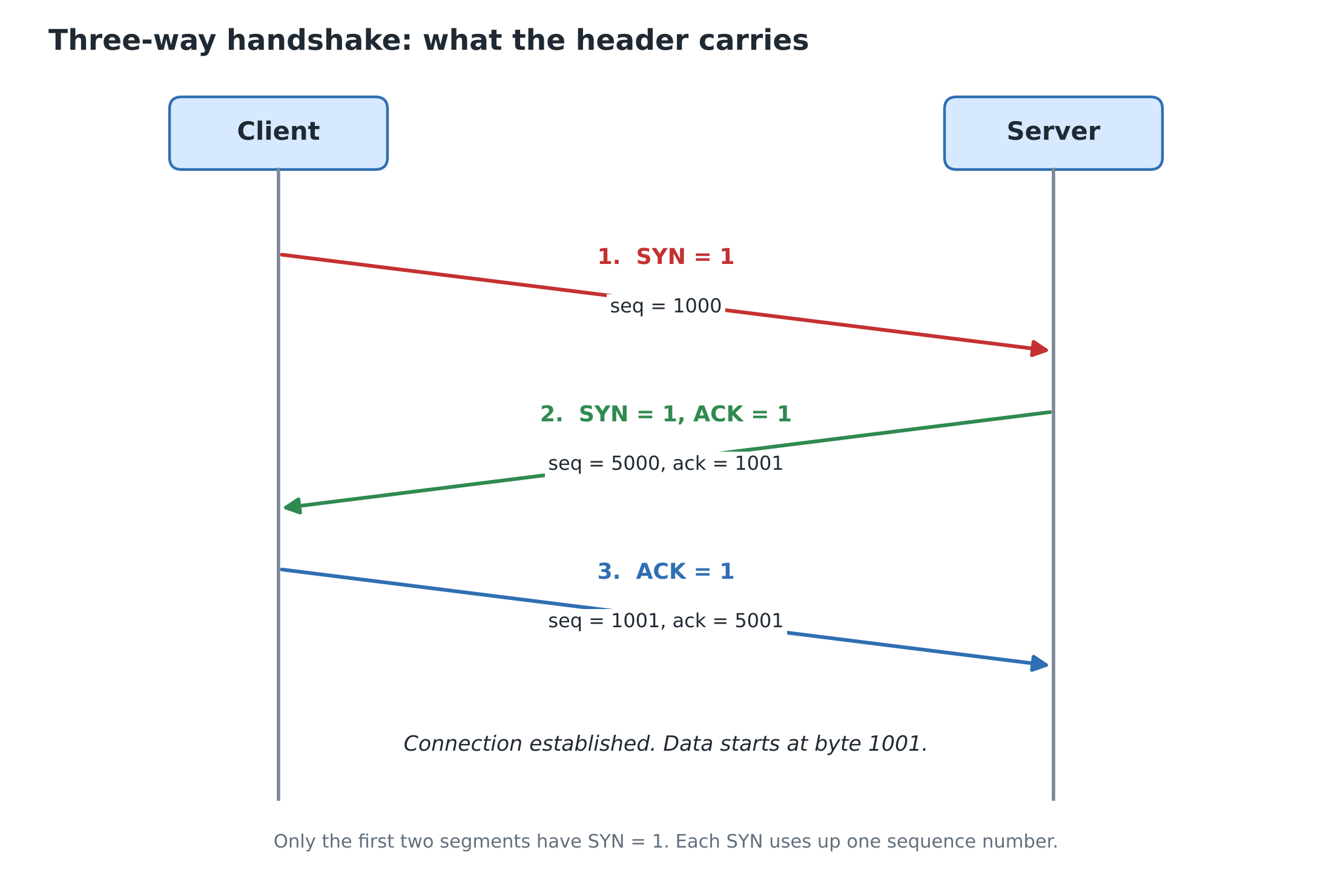
- The client sends a segment with SYN = 1 and its starting sequence number, say 1000. This segment has no data.
- The server replies with SYN = 1 and ACK = 1. It picks its own starting number (5000) and acknowledges the client with ack = 1001.
- The client sends ACK = 1 with ack = 5001. The connection is open.
Why 1001 and not 1000? A SYN counts as one byte of sequence space even though it carries no data, so the next expected number moves up by one. Closing works the same way with FIN, and a FIN also uses up one sequence number.
7. Window size (16 bits)
This is how TCP does flow control. The receiver uses this field to say how many more bytes it currently has room for in its buffer.
Picture pouring water from a jug into a glass. A fast sender is the jug, a slow receiver is the glass. The window field is the receiver telling the sender how much space is left in the glass, so nothing spills over.
Being 16 bits, the window can go up to 65,535 bytes. That turned out to be too small for fast modern networks, so a Window Scale option was added. With scaling, the effective window can reach about 1 GB.
8. Checksum (16 bits)
Works the same way as UDP's checksum: it covers the TCP header, the data, and the 12-byte IP pseudo-header. The difference is that in TCP the checksum is always mandatory.
9. Urgent pointer (16 bits)
Only used when the URG flag is 1. Its value is added to the sequence number to find where the urgent data inside the segment ends. The classic example is pressing Ctrl + C in a remote terminal session: the interrupt should jump the queue instead of waiting behind everything else.
10. Options (0 to 40 bytes)
Extra settings, mostly agreed on during connection setup. Three you should know:
- MSS (Maximum Segment Size): the largest chunk of data a host is willing to receive in one segment, chosen so IP doesn't have to fragment it.
- Window Scaling: lets the window grow past 65,535 bytes, as described above.
- SACK (Selective Acknowledgment): lets the receiver say "I got bytes 1 to 100 and 201 to 300, but not 101 to 200," so the sender only resends the missing piece instead of everything after it.
UDP vs TCP side by side
| UDP | TCP | |
|---|---|---|
| Header size | Fixed 8 bytes | 20 to 60 bytes |
| Connection | None. Just send | Three-way handshake to open, FIN exchange to close |
| Ordering | No sequence numbers | Every byte numbered |
| Reliability | Best effort. Lost or duplicate packets aren't fixed | Lost data is resent using timers and ACKs |
| Flow control | None | Window size field |
| Checksum | Optional in IPv4, mandatory in IPv6 | Always mandatory |
| Typical uses | DNS, VoIP, video streaming, DHCP, online games, QUIC (HTTP/3) | Web browsing (HTTP/HTTPS), file transfer (FTP), SSH, email (SMTP) |
A good way to remember which apps use which: in a video call, a frame that shows up late is useless, so it's better to drop it and move on. That suits UDP. When you download a PDF, one missing byte corrupts the whole file, so you need every byte. That suits TCP.
Two worked problems
These are the kinds of questions that show up in GATE and semester exams. Try them before reading the solution.
Problem 1: decode a UDP header
A UDP header in hexadecimal is: CB84 000D 001C 001C
Find the source port, destination port, total length, and the size of the data.
Solution. Split the 8 bytes into four 16-bit fields and convert each to decimal.
| Field | Hex | Decimal |
|---|---|---|
| Source port | CB84 | 52100 |
| Destination port | 000D | 13 |
| Length | 001C | 28 |
| Checksum | 001C | (not needed) |
- Source port = 52100
- Destination port = 13
- Total length = 28 bytes
- Data size = 28 - 8 = 20 bytes
Bonus inference: the destination port 13 is a well-known port (the daytime service) and the source port is a large random number, so this packet is going from a client to a server.
Problem 2: decode a TCP header
A TCP header in hexadecimal is:
05320017 00000001 00000000 500207FF 00000000
Find the ports, sequence number, header length, which flags are set, and the window size.
Solution. Take it one 32-bit word at a time.
Word 1, 0532 0017:
- Source port = 0x0532 = 1330
- Destination port = 0x0017 = 23 (Telnet)
Word 2, 00000001: sequence number = 1
Word 3, 00000000: acknowledgment number = 0
Word 4, 5002 07FF: this one needs unpacking into bits.
5      0    0    2
0101   0000 0000 0010
HLEN | Reserved (6) | Flags (6)
- HLEN =
0101= 5, so the header is 5 × 4 = 20 bytes (no options) - The last 6 bits are
000010. Reading them as URG ACK PSH RST SYN FIN, only SYN is 1 - Window = 0x07FF = 2047 bytes
Word 5, 0000 0000: checksum and urgent pointer are both 0.
So this is a SYN segment with ACK = 0, which means it is the very first segment of a three-way handshake: a client asking to open a Telnet connection.
Quick self-check
- What is the smallest value the UDP Length field can hold? (8)
- A TCP header has HLEN = 1010 in binary. How many bytes of options does it carry? (10 × 4 = 40 bytes total, so 40 - 20 = 20 bytes of options)
- Which header field is how TCP does flow control? (Window size)
- In IPv4, can a UDP sender skip the checksum? (Yes, by sending all zeros. In IPv6 it can't.)
- Which segments of the three-way handshake have SYN = 1? (The first two)
- How big is the IPv4 pseudo-header, and is it sent over the network? (12 bytes. No, it is only used to compute the checksum.)
- A client's SYN has seq = 3000. What ack number does the server put in its SYN+ACK? (3001)
Wrapping up
When you're stuck on a TCP or UDP question, go back to the headers. UDP has four fields because it only does addressing, length, and an error check, and that is why it is quick and why it can lose data. TCP adds sequence numbers, acknowledgment numbers, flags, and a window, and each of those fields is the reason it can deliver every byte in order over a network that loses and reorders packets. If you can draw both header diagrams from memory and remember that HLEN counts in 4-byte words, you're ready for most exam questions on this topic.
Comments
Join the discussionNo comments yet. Be the first to comment.